Every student in India is required to create and obtain an ABC ID Card. This unique 12-digit identification number enables students to securely store, manage, and access their academic credits, including degrees, diplomas, certificates, educational records, and co-curricular accomplishments, all in digital form.
Create or Update ABC ID
Create a new Academic Bank of Credits ID or update your existing profile details easily.
Login DigilockerManage & Download Credits
Access your academic credits, view progress, and download official ABC statements.
Login abc.gov.inThis ID acts as a digital identity for students within the education system. You can generate or register for your ABC ID through DigiLocker or the official website abc.gov.in. In this article, we’ll explain the complete process step by step.
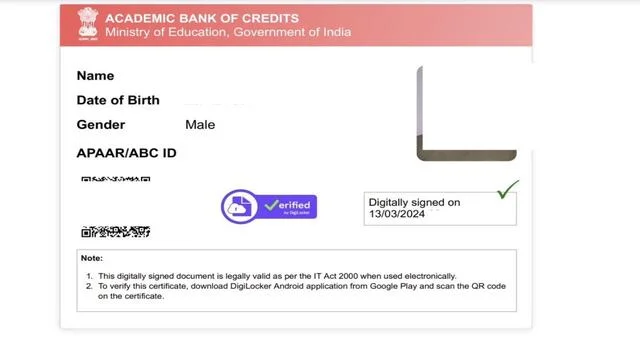
Create an ABC ID via DigiLocker Portal
1. Visit DigiLocker: Go to the official DigiLocker website at digilocker.gov.in
2. Sign In or Sign Up:
- For existing users: Click on “Sign In”, then enter your registered mobile number, Aadhaar number, or username along with your password. Verify your identity using the OTP sent to your registered mobile number.
- For new users: Click on “Sign Up” and follow the on-screen instructions to create a new DigiLocker account.
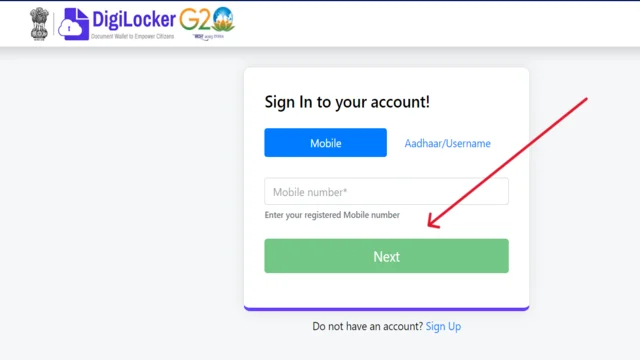
3. Search for the ABC Card:
- After logging in, go to the “Search Documents” section.
- In the search bar, type “Academic Bank of Credits (ABC Card)” or navigate to it under the “Education” category.
- Then, click on the “Academic Bank of Credits (ABC Card)” option to proceed.
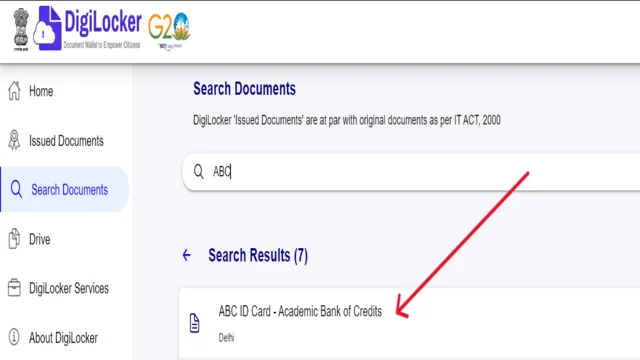
4. Create Your ABC Card:
- Fill in the required details:
- Name (matching your Aadhaar card)
- Date of Birth
- Gender
- Admission Year
- Identity Type (e.g., Aadhaar)
- Identity Value (your Aadhaar number)
- Institution Name (if known)
- Check the consent box and click on “Get Document” to generate your ABC ID.
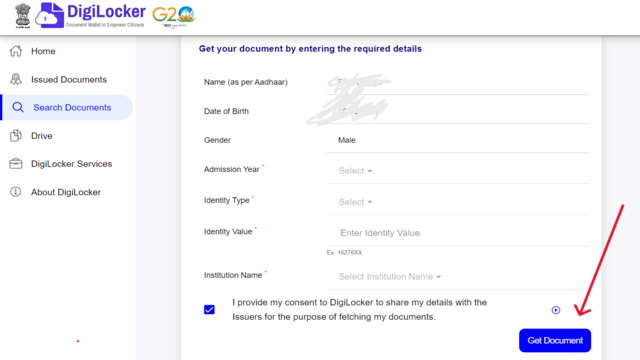
5. Access and Share Your ABC ID:
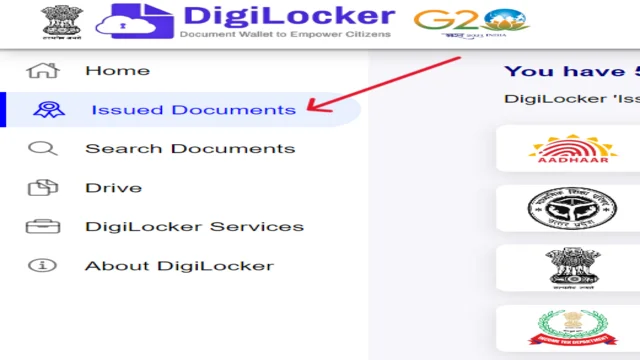
- Your ABC ID will appear under the “Issued Documents” section in your DigiLocker account.
- You can easily share your ABC Card with educational institutions whenever required.
Create an ABC ID Card via abc.gov.in Portal
You cannot directly generate an ABC ID card on the ABC.gov.in website. However, it can be created through your DigiLocker account, which is connected to the ABC portal. Follow the steps below to complete the process:
- If you don’t already have a DigiLocker account, create one first by signing up on the official DigiLocker website.
- Go to the official ABC website to proceed with the process.
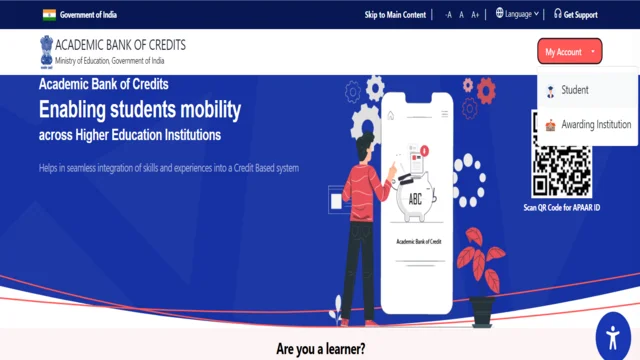
- Access Your Account: Click on the “My Account” tab and choose the “Student Login” option to continue.
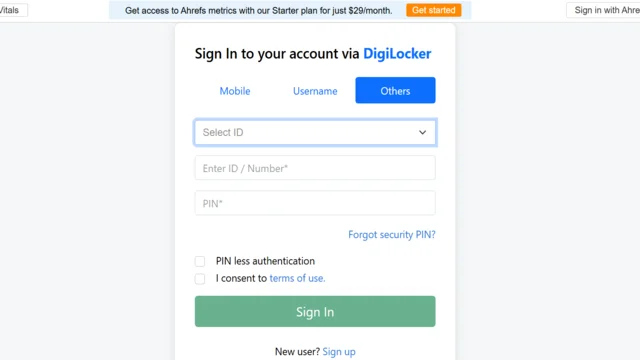
- Log in with DigiLocker Credentials: Sign in using your DigiLocker username and password.
- Review the Consent Message: Read the on-screen message carefully; it explains what information the ABC portal will access from your DigiLocker account.
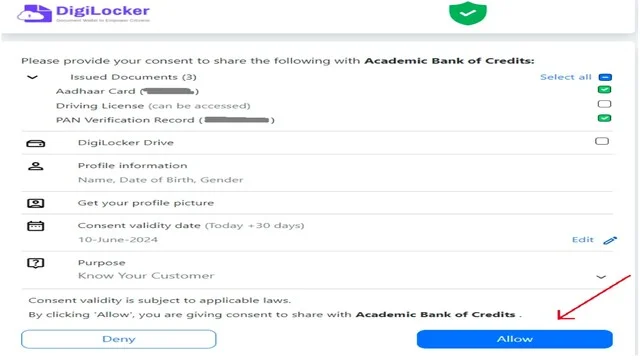
- Click “Allow” to Proceed: If you agree to share your data, click the “Allow” button. This authorizes the ABC portal to access your information from DigiLocker to create your ABC ID card.
- Generate ABC ID: Next, click on the “Generate (ABC) ID” button to complete the process.
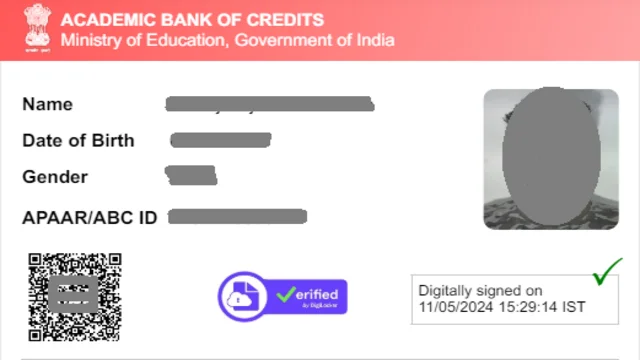
- Download ABC ID Card: After your ID is successfully generated, you can download it in PDF format for your records.
How Does the ABC System Work?
The Academic Bank of Credits (ABC) system allows students to seamlessly transfer their earned academic credits between recognized universities with their consent. This promotes a flexible and personalized learning pathway. By creating an ABC account, students can easily monitor their accumulated credits and utilize them when transferring institutions or continuing higher studies.
Creating an ABC Account:
- Visit the official portal at www.abc.gov.in to begin registration.
- Enter your personal and academic details as required.
- After successful registration, you’ll receive a unique 12-digit ABC ID along with your login credentials.
Earning and Storing Credits:
- Credits are granted upon successful completion of courses.
- Participating institutions upload these credits to the ABC platform, which automatically adds them to the student’s account.
- The ABC system serves as a secure digital repository for all earned academic credits.
Types of Courses Covered:
- The system supports on-campus, distance learning, and online education platforms such as SWAYAM, NPTEL, and V-LAB.
Credit Verification & Evaluation:
- Periodic verification ensures that all credits are accurate and meet the requirements for diplomas or degrees.
- Students can easily monitor their accumulated credits and download verified academic records anytime.
Credit Transfer System:
- Students can seamlessly transfer their earned credits when changing colleges or courses, eliminating the need to retake completed subjects.
- The entire transfer process is conducted digitally, ensuring security and transparency.
Credit Validity:
- Earned credits remain valid for up to 7 years, allowing students the flexibility to take breaks in their education.
- The validity period may differ for certain courses, and the ABC system will notify students accordingly.
Uses of ABC ID:
- Acts as a verified academic record for admissions, scholarships, and job applications.
- Can be seamlessly linked with DigiLocker for safe and convenient digital document storage.
Key Features of ABC ID:
The Academic Bank of Credits (ABC) system provides students with the flexibility to earn, accumulate, and transfer credits across recognized institutions. With an ABC ID, students can securely store and share their academic records digitally, promoting a smoother educational process and a more personalized learning journey.
- Credit Accumulation: Earn credits from multiple recognized institutions.
- Credit Transfer: Seamlessly transfer your credits when switching between colleges or universities.
- Digital Record: Securely store and share all your academic records online.
- Improved Efficiency: Simplifies admission, verification, and credentialing processes.
- Transparency: Encourages a transparent and accountable education ecosystem.
- Personalized Learning Paths: Customize your education by selecting courses from different institutions and accumulating credits.
Can Co-Curricular Activities Be Included for Credit in the ABC System?
Yes, the ABC system recognizes that education extends beyond classroom learning. Many institutions now grant credits for co-curricular activities such as sports, leadership programs, internships, and community service.
These experiences are considered vital for a student’s overall development. By incorporating such non-academic achievements into the ABC platform, students are encouraged to pursue a holistic and well-rounded education that values both academic excellence and extracurricular growth.
FAQ
What is an ABC ID Card?
The ABC ID Card, or Academic Bank of Credits ID, is a unique 12-digit identification number issued to students in India. It allows them to digitally store, manage, and transfer their academic credits and records across recognized educational institutions.
How can I create my ABC ID Card?
You can generate your ABC ID Card through the DigiLocker portal or the official ABC website (abc.gov.in) by linking your Aadhaar and providing basic academic details.
What are the benefits of having an ABC ID Card?
The ABC ID Card enables students to securely store academic data, easily transfer credits between institutions, access verified educational records, and enjoy a flexible and transparent learning experience.
Is the ABC ID Card mandatory for all students?
Yes, the Government of India has made it mandatory for all students to register for an ABC ID to streamline academic record management and support the National Education Policy (NEP) 2020 framework.